
Free
START HERE$0/ month
For personal apps and first projects.
- 10 apps
- 10 databases
- CLI for developers and coding agents
- 10 GB public bandwidth per month
- A livehq.app URL for each app
- No custom domains
Web app hosting for Mac
LiveHQ turns your Mac into a server for web apps and APIs. Deploy a project, get a secure HTTPS URL, and choose who can open it.
Apple Silicon · macOS 15+ · Docker Desktop
Local builds. Local databases. Managed HTTPS.
Explore LiveHQ01 /Your hosting control center
Deploy projects, check logs and resource usage, manage databases, and control access from the LiveHQ Mac app.
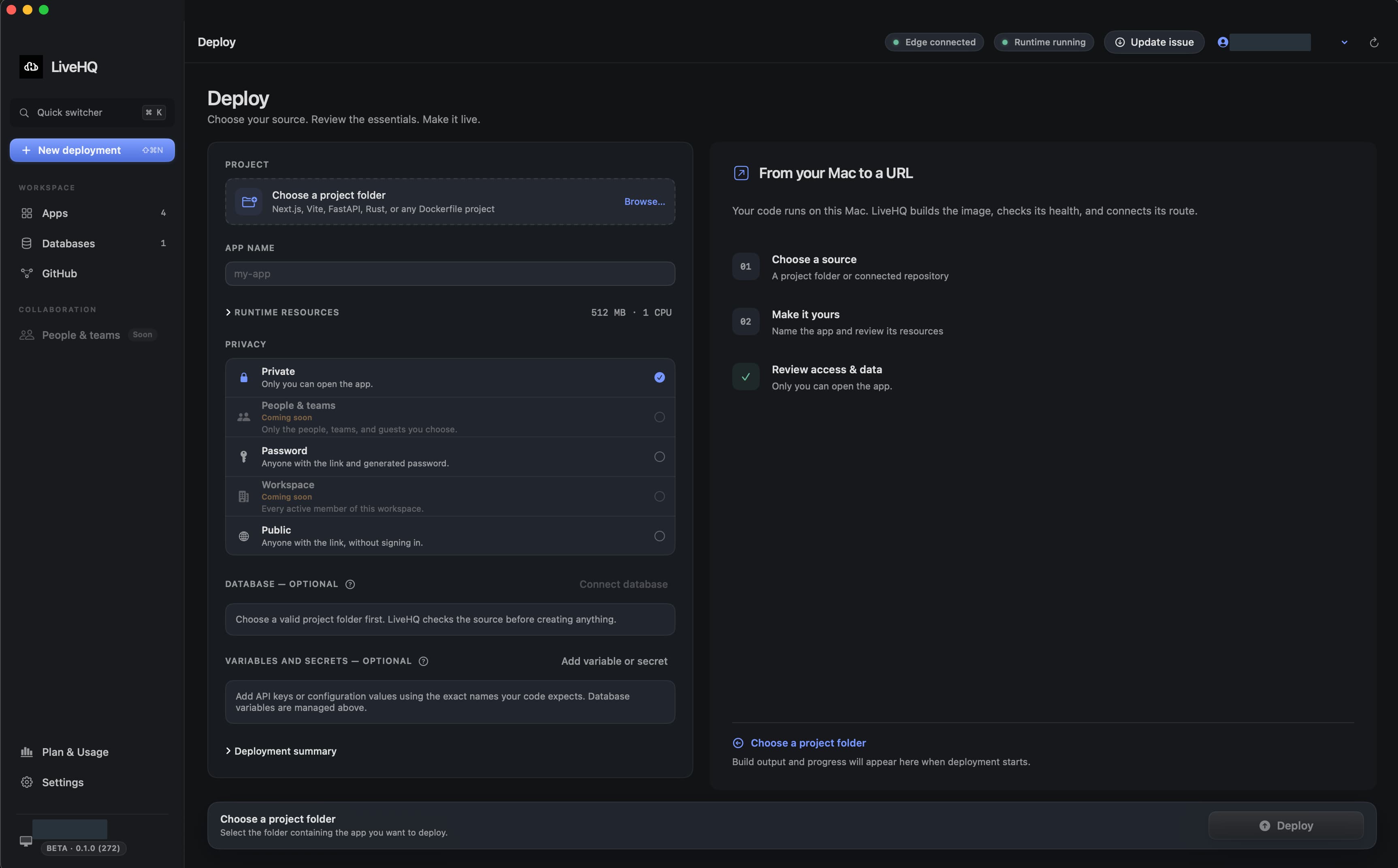
Choose a detail to zoom in, or enlarge the full screenshot.
Select a local folder or a GitHub repository. Set resources and access, add a database if needed, and follow each stage of the deployment.
Deploy your first project02 /How deployment works
Choose a folder, connect GitHub, or use the command line. LiveHQ builds and starts your app on your Mac, checks its health, then connects its URL.
livehq deploy ./my-app --output jsonUse the signed CLI yourself or with a coding agent.
When you redeploy, LiveHQ checks the new version before changing the route. A failed health check leaves the previous healthy version selected.
Play the demo to step through a deployment.
Deployment demo · simulated output
Managed builds and standard container support
03 /Where your code and data live
LiveHQ builds your source and stores managed databases on your Mac. Here’s what stays local and what its online services handle.
Your project is built through Docker Desktop on your Mac. LiveHQ doesn’t send it to a remote build service.
Your managed databases live on your Mac’s disk. Database Studio lets you work with them locally.
Runtime secrets use macOS Keychain and are passed to your app when it runs. They stay out of ordinary image builds.
Visitors connect over HTTPS to LiveHQ’s public edge. Allowed requests travel back to your Mac over its outbound connection.
LiveHQ’s online services manage sign-in, routing, access policy, and limited deployment logs with secrets redacted.
Your app can still send data to external services it calls.
04 /Private by default
Keep an app for yourself, share it behind a password, or make it public. LiveHQ checks access at its public edge before forwarding requests to your Mac.
Visitors to your app
HTTPS · shielding · access
Your apps and databases
Example request path · choose an access mode
Only you can open the app, after signing in. This is the default for new apps.
Cloudflare handles public HTTPS and DDoS shielding in front of LiveHQ’s edge. Flood traffic is absorbed there, and your Mac’s IP address is not published as the app’s origin.
No port forwarding. No static IP. No router changes.
See how LiveHQ protects your Mac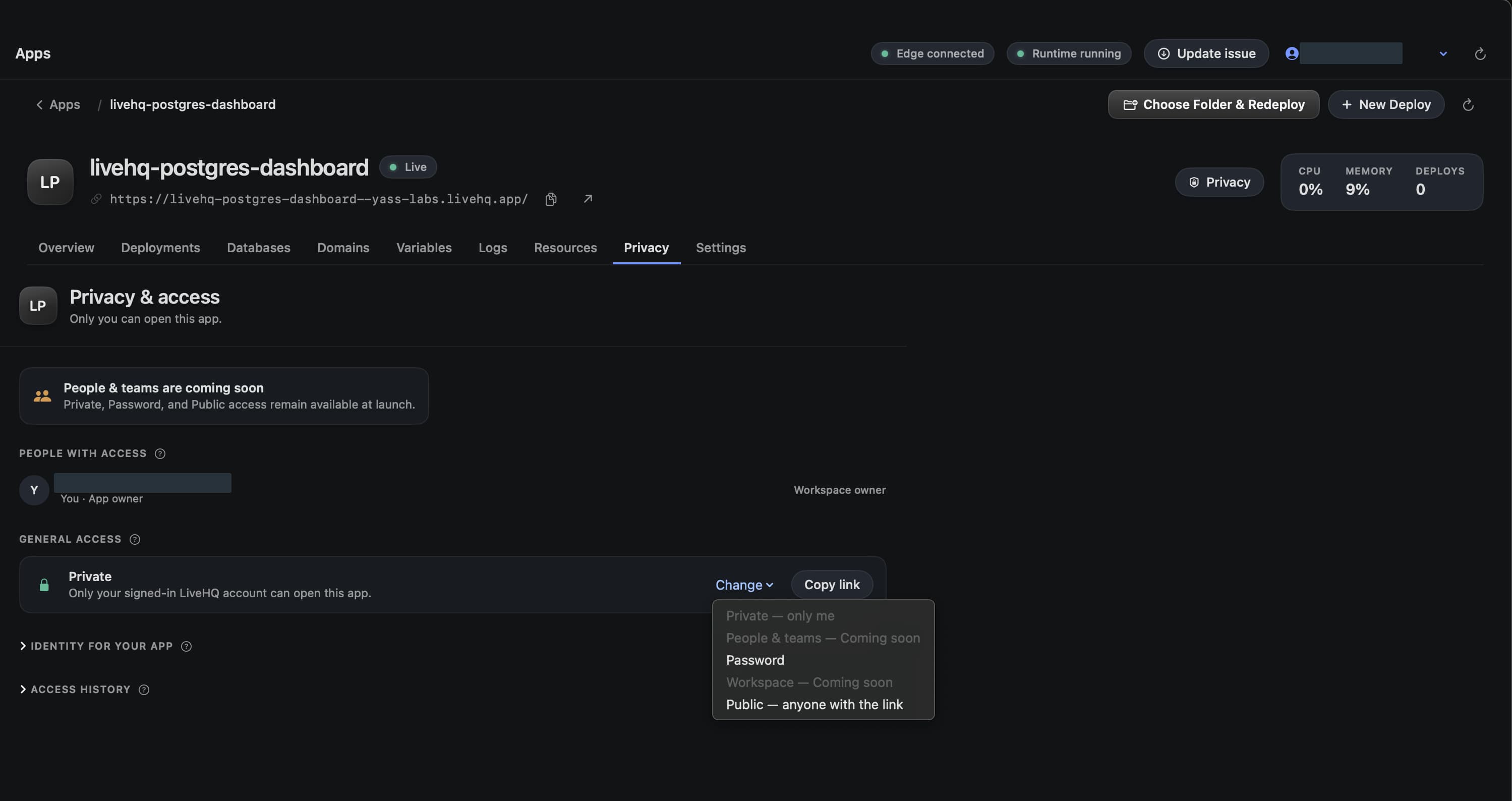
Choose a detail to zoom in, or enlarge the full screenshot.
Who LiveHQ is for
Independent developers
Run a web app, an API, and PostgreSQL on your Mac, with a URL you can share.
Freelancers and studios
Let clients review work behind an app password. Change access when the review ends.
Personal software
Keep a personal dashboard private, or let your coding agent deploy an app through the CLI.
05 /Plans for the apps you host
Your Mac supplies the compute. Free includes apps, databases, and managed URLs. Pro adds more capacity and custom domains. Manage your subscription in LiveHQ’s Plan & Usage screen.
$0/ month
For personal apps and first projects.
Monthly
See current pricing in the app under Plan & Usage.
Soon
Shared access for people and workspaces.
Public bandwidth measures data sent to visitors through LiveHQ’s edge, in decimal GB. Free resets each UTC calendar month; Pro resets each billing period. Apps and databases share the capacity of your Mac.
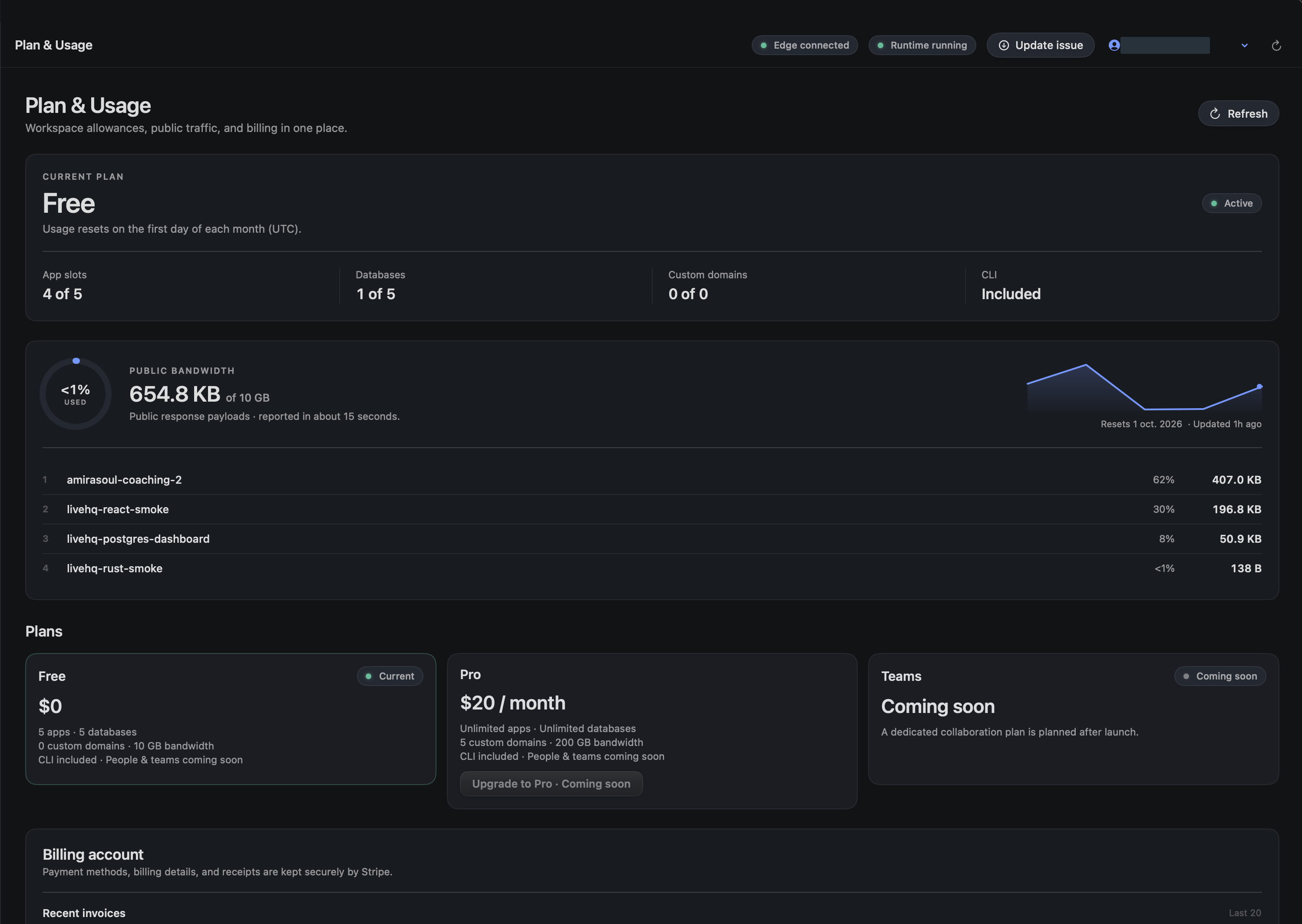
Choose a detail to zoom in, or enlarge the full screenshot.
Hosting requirements
LiveHQ runs trusted projects on an Apple Silicon Mac with Docker Desktop. If the Mac sleeps, Docker stops, or the internet connection drops, visitors cannot reach your apps. Choose workloads that fit that availability.
Read the setup requirementsLiveHQ is a Mac app for hosting web apps, APIs, and databases on an Apple Silicon Mac. It builds and runs your projects through Docker Desktop, gives your apps HTTPS URLs, and lets you manage deployment, data, and access from the same app.
LiveHQ supports managed builds for Next.js, React, Vite, Vue, Nuxt, SvelteKit, Astro, Node.js, FastAPI/Python, and Rust. Other web apps and services can use a standard Dockerfile or Containerfile. Use it for projects you trust.
Yes. Your Mac must stay awake, Docker Desktop must be running, and the internet connection must remain available. If any of these stop, visitors cannot reach your apps. LiveHQ does not move the workload to a cloud server when your Mac is offline.
No port forwarding or static IP is needed. Your Mac makes an outbound connection to LiveHQ. Your app’s public hostname points to the edge, and your Mac’s IP address is not published as the app’s DNS origin.
LiveHQ builds your code and runs managed PostgreSQL and SQLite on your Mac. Database Studio works locally. Web requests pass through the public edge; LiveHQ’s online services also manage accounts, routes, access rules, and redacted deployment logs. Your own app can still send data to services it calls.
Yes. Create a managed PostgreSQL or SQLite database and attach it to your app. PostgreSQL supports multiple apps with separate credentials; SQLite supports one attached app. Backups are coming soon.
Yes, on Pro. Add the domain in LiveHQ and create the DNS record it shows you. LiveHQ displays the verification and HTTPS setup status. Free apps use managed livehq.app URLs.
Yes. The signed livehq CLI lets developers and coding agents deploy projects and manage supported app operations. It returns structured results, including the failed step and recovery guidance, without giving the agent direct access to Docker’s control socket.
A tunnel gives an existing local service a path to the internet. LiveHQ also builds and runs the app, checks new versions before routing traffic to them, manages databases, provides access controls, and offers logs and resource controls. The app still runs on your Mac.
Free includes 10 apps, 10 databases, CLI access, managed livehq.app URLs, and 10 GB of public bandwidth each month. Pro adds unlimited app and database counts, custom domains, and 200 GB per billing period. Your Mac’s hardware still determines how much you can run. Teams is coming soon.
Start hosting with LiveHQ
Install LiveHQ, choose a project, and host it on the Mac you already own. The getting started guide walks you through the setup.
Free plan available · Apple Silicon · macOS 15+